



Update P-touch Editor (Windows)
Before updating P-touch Editor, install the printer driver.
- Start the P-touch Update Software.
- Windows 10/Windows Server 2016:
Click , or double-click the P-touch Update Software icon on the desktop.
- Windows 8/Windows 8.1/Windows Server 2012/Windows Server 2012 R2:
Click the P-touch Update Software icon on the Apps screen, or double-click the P-touch Update Software icon on the desktop.
- Windows 7/Windows Server 2008/Windows Server 2008 R2:
Click , or double-click the P-touch Update Software icon on the desktop.
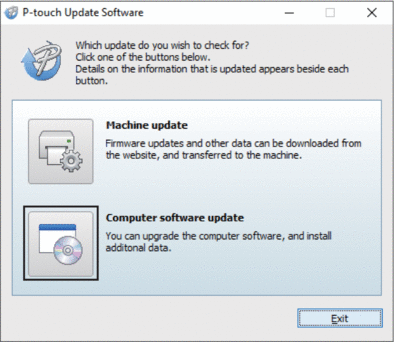
- Click the Computer software update icon.
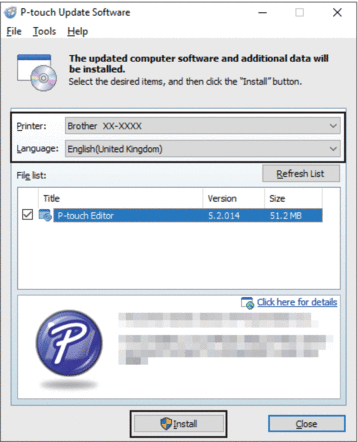
- Select the Printer and Language options, select the check box next to P-touch Editor, and then click Install.
When finished, a confirmation dialog appears.
Did you find the information you needed?