

Home > Appendix > Optional Accessories > Single Active Docking Station (Optional: PA-CR-002A) > Install the Mounting Arm on the Single Active Docking Station (Optional: PA-CR-002A)


Install the Mounting Arm on the Single Active Docking Station (Optional: PA-CR-002A)
Optional Mounting Arms corresponding to the RAM-202U mount are offered for use with the Docking Station which allow a more versatile method of positioning the printer.
- Secure one of the mounting flanges from the movable arm to the bottom of the Docking Station, with the four (4) #10 - 32 or #10 - 24 screws supplied with the Mounting Arm.
- Secure the other mounting flange on the movable arm to the desired mounting surface.
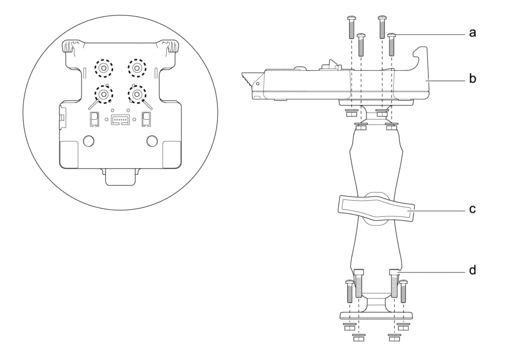
- Screw to secure to the Docking Station
- Docking Station
- Tightening Clamp
- Screw to secure to mounting surface
You can use the #10 - 24 x 3/4 in. (19.05 mm) screws and associated hardware supplied in the Mounting Arm Kit, or use other hardware suitable for the mounting conditions.
Did you find the information you needed?