

Home > Appendix > Optional Accessories > Single Active Docking Station (Optional: PA-CR-002A) > Charge the Rechargeable Li-ion Battery Using the Single Active Docking Station (Optional: PA-CR-002A)


Charge the Rechargeable Li-ion Battery Using the Single Active Docking Station (Optional: PA-CR-002A)
The Single Active Docking Station (PA-CR-002A) cannot recharge the printer's rechargeable Li-ion battery without being connected to an AC power outlet using the AC Adapter (PA-AD-600A).
Before Charging the Rechargeable Li-ion Battery
- Remove the Docking Station terminal cover with a flathead screwdriver.
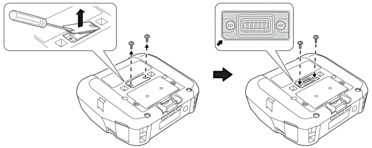
- Install the Docking Station Terminal Attachment onto the printer using the Docking Station Terminal Attachment and screws included with the Docking Station.
 Make sure the notched corner is aligned correctly.
Charge the Rechargeable Li-ion Battery
- Connect the AC Adapter to the Docking Station's DC Connector.
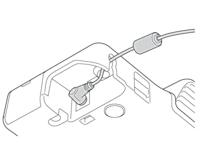
- Connect the AC power cord to the AC Adapter.
- Connect the AC power cord to a nearby AC power outlet.
- Align the Docking Station Terminals of the Docking Station and the printer.
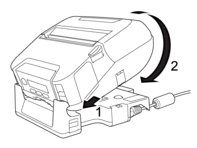
- Press the printer down and onto the Docking Station until the latches lock it firmly in place.The printer’s LED Indicator lights in orange when charging.
- The printer’s LED Indicator will turn off when charging is complete.
Remove the Printer from the Docking Station
- Push the Eject Button on the back of the Docking Station, lift the printer, and then remove it from the Docking Station.
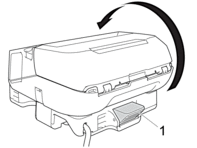
- Eject Button
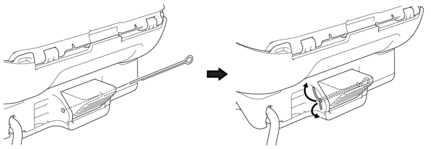
Lock the Eject Button
- Insert a cotter pin (or similar) through the hole as illustrated below.Use a Low Carbon Steel Extended Prong Retaining Cotter Pin (not included): Length: 1.97" (50 mm), Pin Diameter: 0.08" (2 mm)
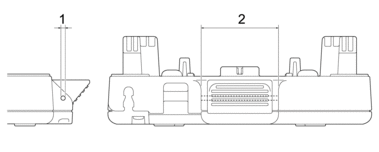
- Diameter: 0.09" (2.3 mm)
- Length: 1.62" (41.2 mm)
To purchase the Cotter Pin, contact your local Brother dealer.
Did you find the information you needed?