

Home > Set Up Your Label Printer > Insert the Tape Cassette


Insert the Tape Cassette
- Place your fingers near the Tape Exit Slot.
- Open the Cassette Cover.
- Confirm the tip of the tape is aligned with the Tape Exit Slot.
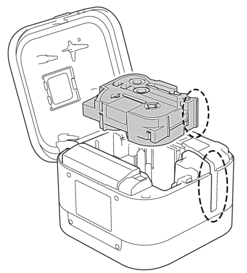
- Insert the Tape Cassette into the Label Printer until it locks into place.
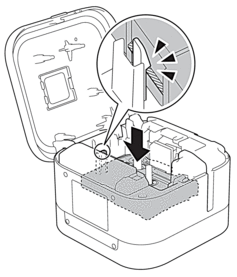

- After the tape passes under the Tape Guide, pull the tip to remove any slack in the tape.

- Make sure the tape is not caught in the unit when inserting or removing the Tape Cassette.
- Close the Cassette Cover.
- CAUTION
- Be careful when closing the Cassette Cover. There is a risk of injury if your finger gets pinched.
- IMPORTANT
- Do not leave any printed labels in the Label Printer. Doing so will cause label jams.
Did you find the information you needed?