

Home > Set Up Your Label Printer > Charge the Battery


Charge the Battery
Fully charge the rechargeable battery before using the Label Printer. 
- Charge the battery in environments between 10°C and 35°C, otherwise the battery will not charge, and the Battery LED will remain lit.
- If the Label Printer is used to print, feed, or perform another operation while charging, charging may stop even when the battery is not fully charged. Charging resumes when the operation is completed.
- To ensure the best performance and longest life from the rechargeable battery, when storing the Label Printer for a long period of time:
- Charge the battery every six months.
- Store the battery in a cool dry place out of direct sunlight, between 10°C and 35°C.
- The Label Printer automatically powers off after a period of inactivity. To change the inactivity period setting:
- Windows
Use the Device Settings tool in the Printer Setting Tool.
Charge the Battery Using a Computer
- Use the included USB cable.
- Make sure the computer is on.
Connect the Label Printer to the computer using the USB cable (included).
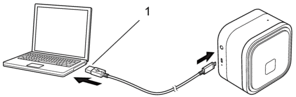
- Computer USB Port
5 V DC, 0.5 A or higher
The Battery LED turns on. Charge the battery until the Battery LED turns off.
Charge the Battery Using a USB AC Adapter
Connect the USB cable to a USB AC Adapter (not included) suitable for charging mobile devices and plug the adapter into an electrical socket.
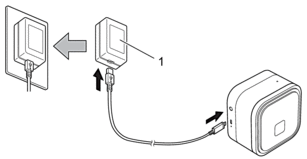
- USB AC Adapter (not included)
5 V DC, 0.5 A or higher
The Battery LED turns on. Charge the battery until the Battery LED turns off.
Did you find the information you needed?