

Home > Set Up Your Label Printer > Parts Description


Parts Description
PT-E720BT
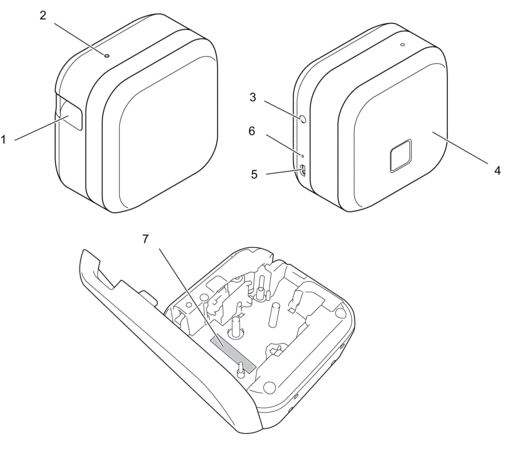
- Tape Exit Slot
- Power LED
Power LED Lit/Flashing Status Green Lit - Feeding and cutting tape.
- Printing
Flashing (0.5 second intervals)
- Receiving data from a mobile device or a computer.
- Transferring a program.
Lit for three seconds, then off for one second Idling with Bluetooth mode on Orange Lit Initializing Flashing (0.5 second intervals)
Cooling Lit for three seconds, then off for one second Idling with Bluetooth mode off  (Power) Button
 - Cassette Cover
- USB Port
- Battery LED
Battery LED Lit/Flashing Status Orange Off Fully charged Lit Charging Off for 3 seconds, then lit for 0.5 seconds Only half the battery charge remains. Off for 2 seconds, then flashing twice The battery charge is low. Flashing (0.5 second intervals)
- Battery not installed
- Insufficient charge or battery failure.
For more information, see Related Topics:Error and Maintenance LED Indications.
- Serial Number
PT-E920BT
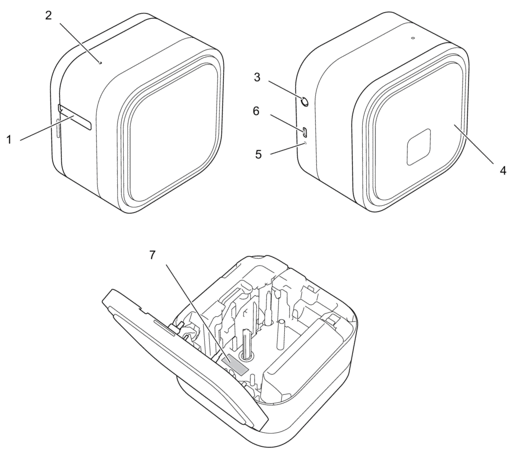
- Tape Exit Slot
- Power LED
Power LED Lit/Flashing Status Green Lit - Feeding and cutting tape.
- Printing
Flashing (1 second intervals)
- Receiving data from a mobile device or a computer.
- Transferring a program.
Flashing Rapidly (0.5 second intervals)
Downloading data Lit for three seconds, then off for one second Idling with Bluetooth mode on Orange Lit Initializing Flashing (1 second intervals)
Cooling Lit for three seconds, then off for one second Idling with Bluetooth mode off - (Power) Button
- Cassette Cover
- Battery LED
Battery LED Lit/Flashing Status Orange Off Fully charged Lit Charging Off for 3.5 seconds, then lit for 0.5 seconds Only half the battery charge remains. Off for 2.5 seconds, then flashing twice
The battery charge is low. Flashing (0.5 second intervals)
- Battery not installed
- Insufficient charge or battery failure.
For more information, see Related Topics:Error and Maintenance LED Indications.
- USB Port
- Serial Number
Did you find the information you needed?