
Adjusting the Feed Roller Position
The feed roller position varies according to the size of the material you are using and whether or not you are using a mat.
If the feed roller is not correctly positioned, the material may not feed correctly. Be sure to check the position of the feed roller before loading.
Feed Roller Position Mark | Use of Mat | Material Size |
|---|---|---|
 | Yes | 12" × 12" (305 mm × 305 mm) mat 12" × 24" (305 mm × 610 mm) mat Mats should be used with any material less than 12" (305 mm) wide or any size other than A4/Letter |
 | No | Material width: Up to 12" (305 mm) Material length: Up to 24" (610 mm) |
 | No | A4/Letter size material |
Pull the shaft release lever on the right side of the machine toward you to release the front shaft.
The right side of the front shaft is raised, and the shaft is released.
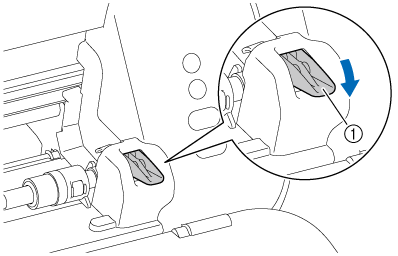
- Shaft release lever
Press the roller lock button to release the feed roller.
When the feed roller is unlocked, you can slide it to the left or to the right.
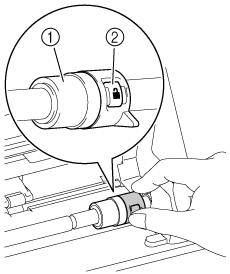
- Feed roller
- Roller lock button
Still pressing the button, slide the feed roller to the position mark that corresponds to the material size.
Release the roller lock button at the position mark you want to lock the feed roller. The roller lock button will slide into a groove in the shaft, locking the feed roller in position.
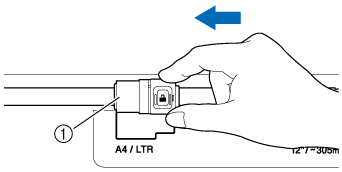
- Feed roller
If the feed roller is not in the correct position, your material or mat will not feed correctly. Be sure to confirm the position of the feed roller before loading your material or mat.
Push the shaft release lever up to return it to its original position.
Once the lever is back in place, the front shaft is locked.
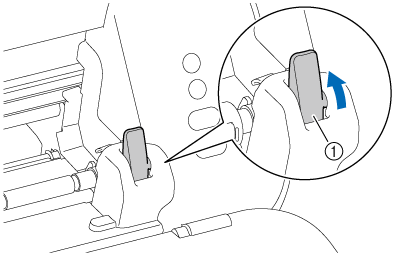
- Shaft release lever
 CAUTION
Be careful not to pinch your fingers while operating the shaft release lever.